I Used Claude Code to Clean My Entire Computer
Claude Code is a coding tool. It reads files, writes code, runs builds, creates PRs.
I used it to organize my entire computer.
Not metaphorically. Not "it helped me think about organization." I mean I opened a terminal, described what I wanted, and watched it move 120+ files, verify backups against an external SSD byte-for-byte, delete 11 GB of duplicates, rename folders, and sort a five-year-old document graveyard into a clean system — all in about two hours across two sessions.
This is not what Anthropic built it for. But it might be the most useful thing I've done with it.
The Problem
I'm an indie hacker running nine products under Helsky Labs, two content platforms, and ongoing agency work at Planetary. My machine had become a mirror of that chaos.
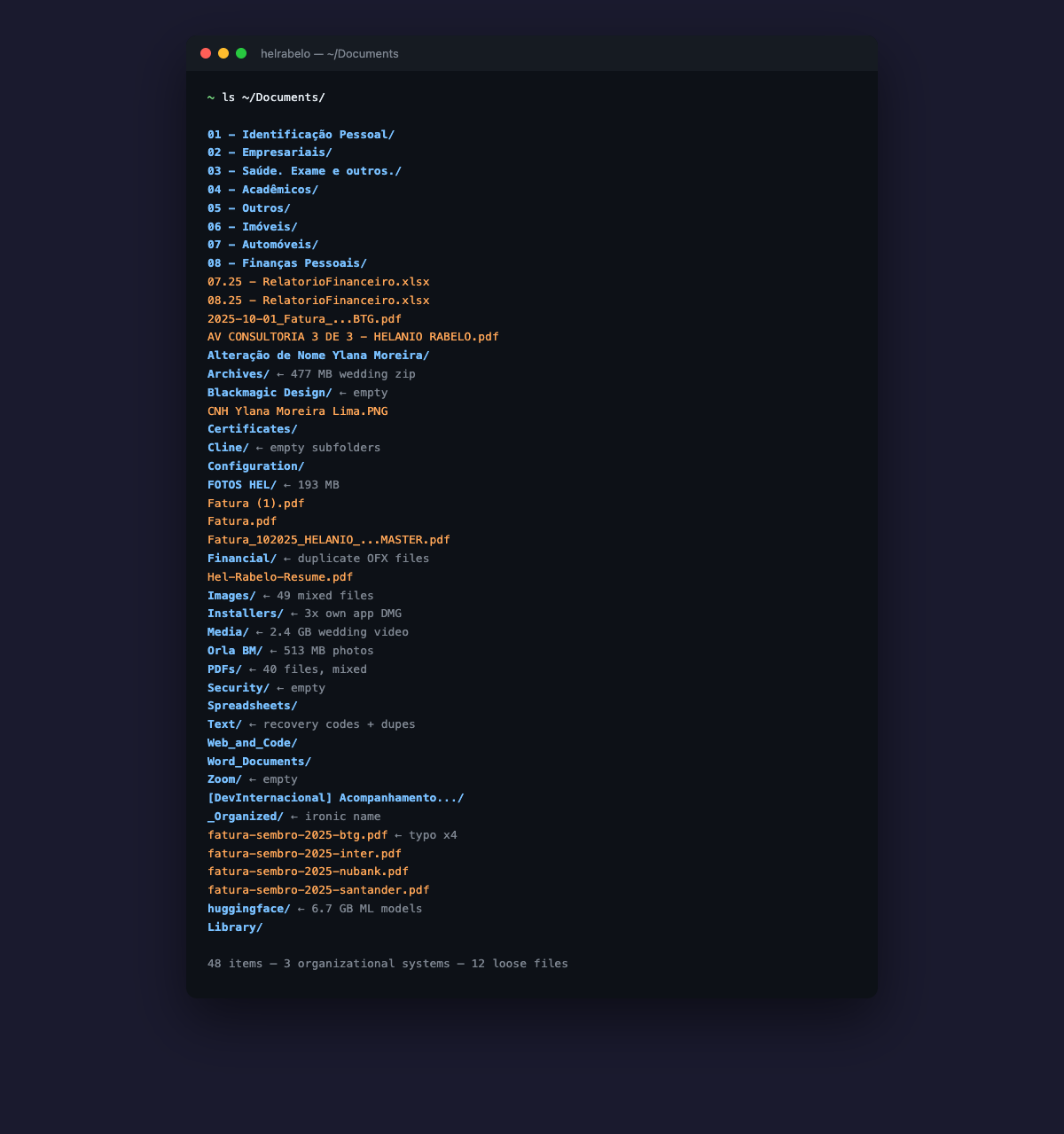
~/Documents/ had 48 items. Three different organizational systems fighting each other. A numbered folder system for Brazilian personal documents — the good one — buried under generic file-type dumps (PDFs/, Images/, Financial/) and random folders that just landed there over the years. A folder called _Organized with an unorganized subfolder called WhatsApp-Transcripts inside it. 6.7 GB of HuggingFace ML models. Three copies of my own app's DMG installer.
If you've been a developer for more than three years, you know this feeling. The cobbler's children have no shoes. We build beautiful systems for clients and leave our own machines to rot.
Why Claude Code
I'd tried cleaning this up before. The problem isn't knowing what to do — it's the tedium. Every file needs a decision. Every decision needs context. Is this a duplicate? Where does it actually belong? Is this backed up somewhere? Can I safely delete it?
Claude Code turned that into a conversation.
I wrote a prompt document — a structured cleanup plan — dropped it into my Obsidian vault, and started a session. Here's what made it different from doing it myself:
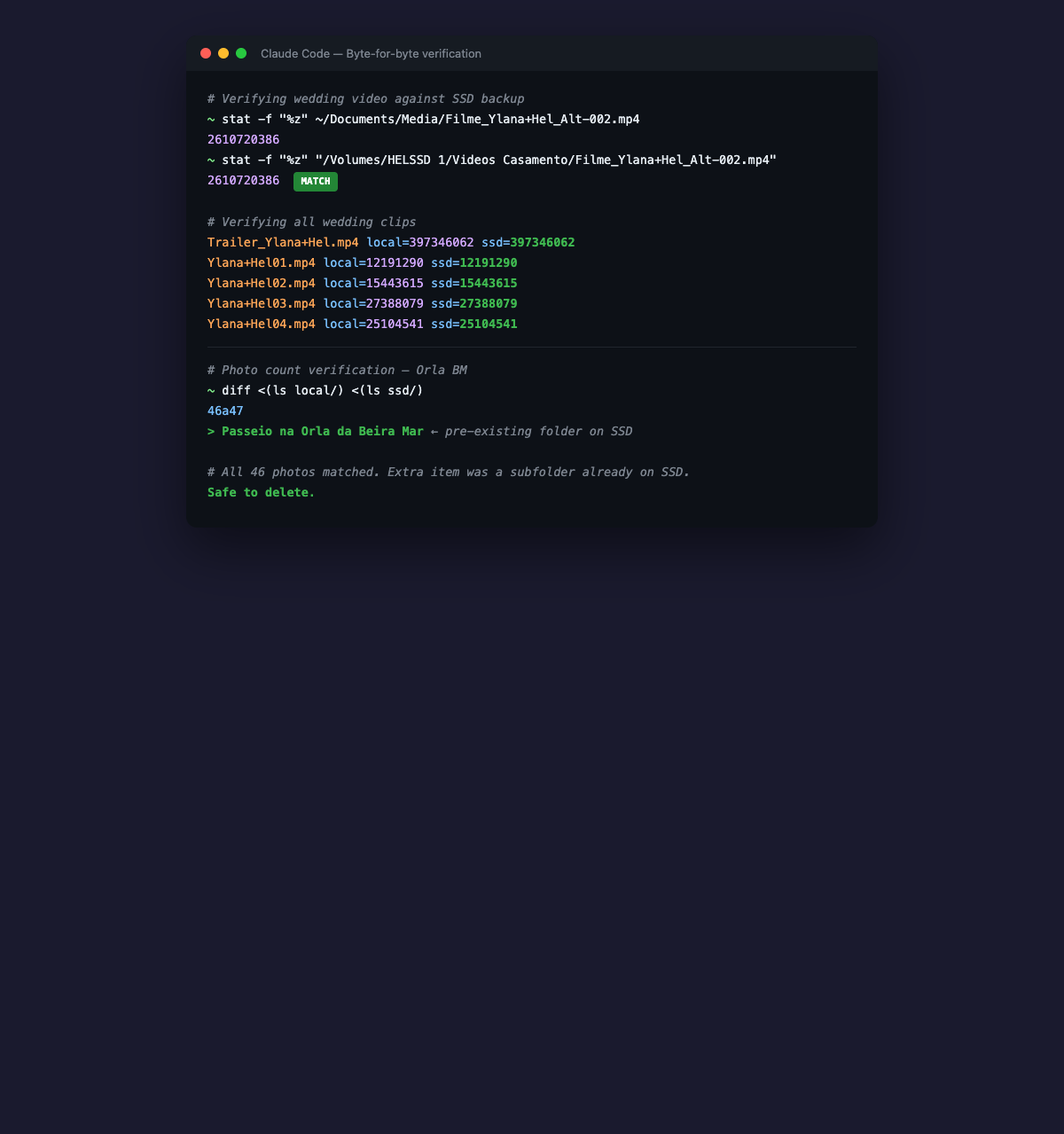
It verified before deleting. When the plan said "delete the 2.4 GB wedding video that's backed up on the SSD," Claude Code didn't just trust the plan. It ran stat -f "%z" on both the local file and the SSD copy. Byte-for-byte match confirmed. Then — and only then — it deleted. Same for the trailer and four wedding clips. Every file checked against the backup before removal.
Filme_Ylana+Hel_Alt-002.mp4: local=2610720386 ssd=2610720386
Trailer_Ylana+Hel.mp4:       local=397346062  ssd=397346062
Ylana+Hel01.mp4:              local=12191290   ssd=12191290
It moved in parallel. While copying 46 photos to one SSD folder, it was simultaneously copying 8 RAW files to another. Independent operations ran concurrently. The kind of thing that's trivial to describe and annoying to orchestrate manually.
It caught edge cases. When copying 46 photos from Orla BM/ to the SSD and verifying counts, the SSD showed 47 items. Instead of panicking or proceeding blindly, it ran a diff on the two directory listings and found one extra item — a pre-existing subfolder on the SSD called Passeio na Orla da Beira Mar. All 46 photos matched. Non-issue, but properly investigated.
It asked before destructive actions. Every delete required my explicit "ok." Not because I configured it that way, but because the prompt said "check with me before deletes" and it respected that boundary every single time. Wedding video? "Can I delete?" Photos confirmed on SSD? "Can I delete?" Old installers? "Can I delete?"
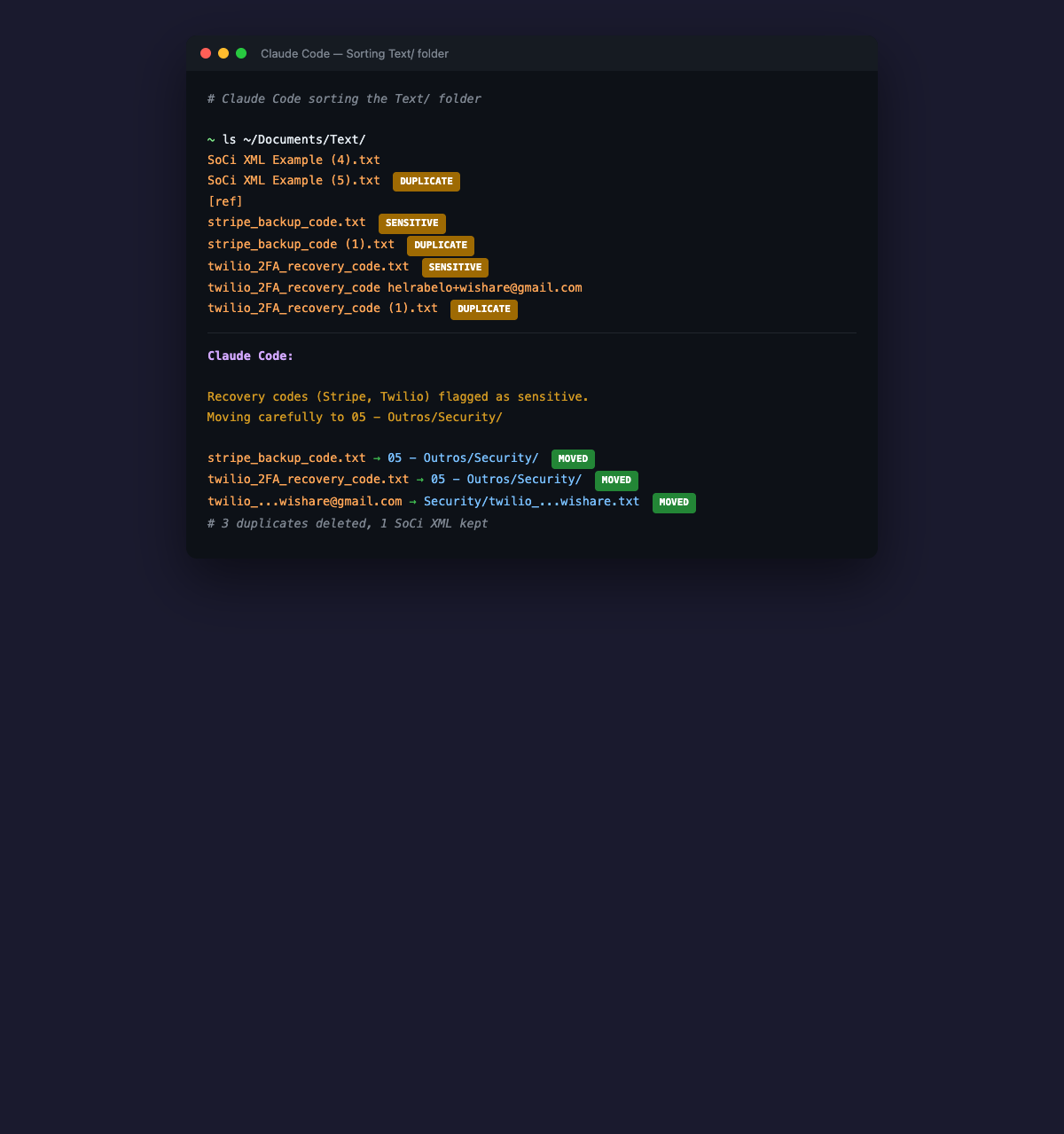
It flagged sensitive files. When sorting the Text/ folder, it found Stripe backup codes and Twilio 2FA recovery codes. It moved them to 05 - Outros/Security/ and called them out as sensitive. I didn't ask it to do that. It just understood that recovery codes aren't the same as a SoCi XML example.
The Actual Session
The work happened in eight steps, all driven from a single cleanup prompt:
- Delete wedding media — 3 GB freed after byte-match verification against HELSSD 1
- Move photos to SSD — FOTOS HEL (8 RAW files, Dec 2024) and Orla BM (46 photos, Aug 2025), verified, deleted from Mac. 700 MB freed.
- Rename numbered folders — removed accents from six folder names.
SaúdetoSaude,Finanças PessoaistoFinancas. Practicality over purism — accents in directory paths are a time bomb. - Sort loose files — 12 files at the Documents root moved to their proper numbered folders. Fixed four "sembro" typos to "setembro" along the way.
- Sort generic file-type folders — the big one. PDFs/, Images/, Financial/, Text/, Spreadsheets/, Word_Documents/, Web_and_Code/, Archives/. Every file categorized by meaning, not format. CVs to job-search. Brand assets to helsky-labs. Bank statements to Financas by year. Duplicates deleted. Empty folders removed.
- Sort standalone folders — DevInternacional, Certificates, Alteracao Nome Ylana, _Organized, Cline (empty), Zoom (empty), Blackmagic Design (empty), huggingface (6.7 GB, deleted). Old macOS system backup archived instead of deleted — I almost nuked a 2021 keychain file, but Claude Code surfaced it and I chose to keep it.
- Rename badly named files —
Passaport.jpegtopassaporte-hel.jpeg,RELATORIO DAM HELANIO (1) (1).pdftorelatorio-dam-hel.pdf, and so on. - Verify final state — nine items in Documents. Eight numbered folders plus Library. Nothing else.
Total: 11 GB freed. 120+ files sorted. 10+ duplicates deleted. 8 empty folders removed.
What Made It Work
Three things.
The prompt was specific. I didn't say "clean up my Documents folder." I wrote a structured document with exact file paths, exact destinations, and exact rules. Every file had a line. Every edge case had a note. "HELSSD 1 must be connected." "Don't touch Library." "Check with me before deletes." Claude Code is good at executing plans. It's not good at reading your mind.
The tool matched the task. File operations are what Claude Code already does — read files, check paths, run shell commands, verify output. I wasn't asking it to do something novel. I was asking it to do what it does in a context it wasn't designed for. Turns out "move this file to that folder and verify the count" is the same cognitive pattern as "refactor this module and run the tests."
I stayed in the loop. Every destructive action was gated on my approval. The keychains moment is the best example — Claude Code would have deleted that Configuration/ folder if I'd said "ok." I didn't. I asked "should we really delete keychains and plists?" and we archived them instead. The AI executes. The human decides. That boundary matters.
The Before and After
Before:
Documents/   (48 items)
├── 8 numbered folders (with accents)
├── 8 generic file-type folders
├── 10 random standalone folders
├── 12 loose files at root
└── Library/
After:
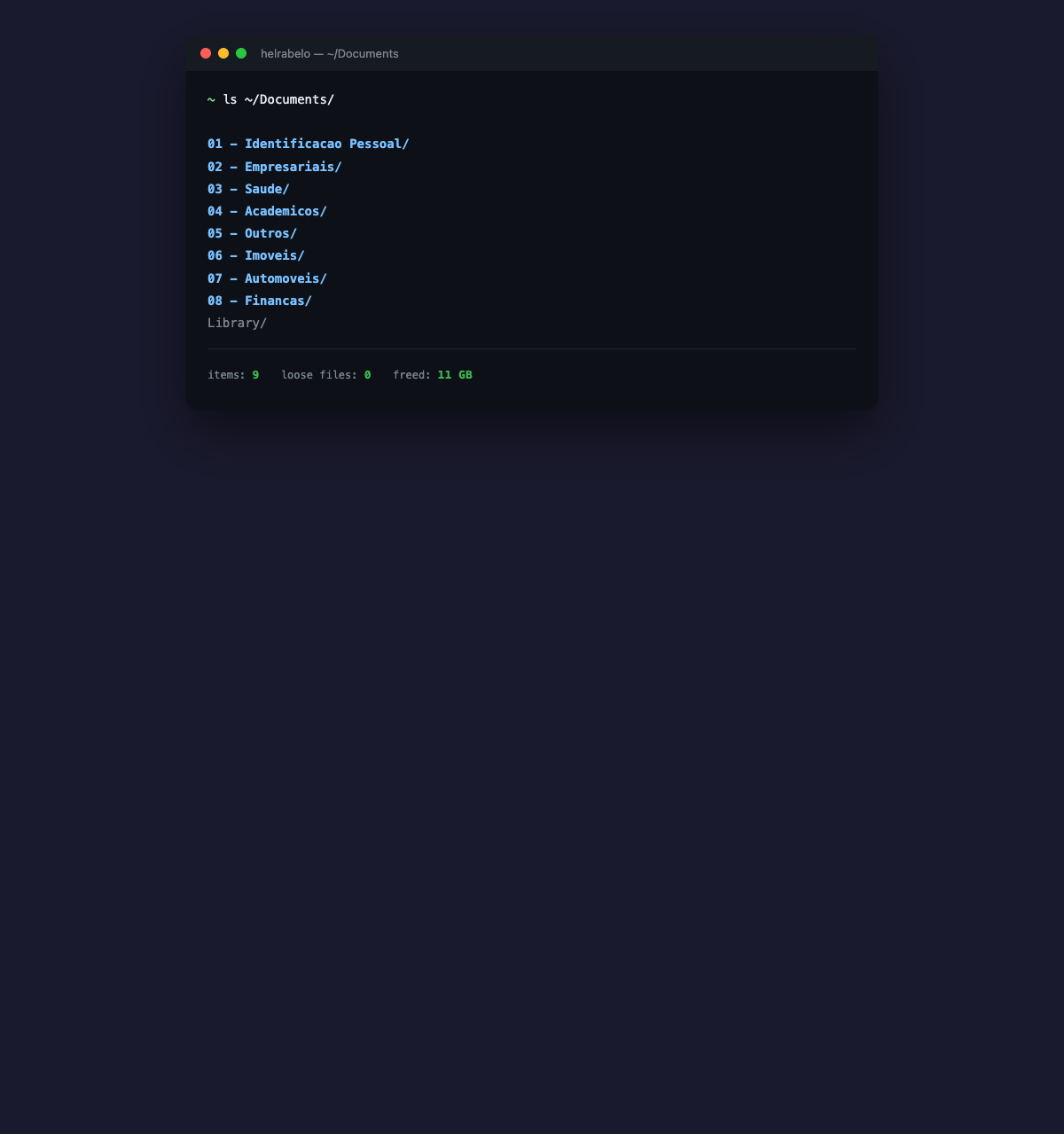
Documents/   (9 items)
├── 01 - Identificacao Pessoal/
├── 02 - Empresariais/
├── 03 - Saude/
├── 04 - Academicos/
├── 05 - Outros/
├── 06 - Imoveis/
├── 07 - Automoveis/
├── 08 - Financas/
└── Library/
The Uncomfortable Part
I'm a senior developer. I build systems for a living. And it took me five years to sort my own Documents folder — not because it was hard, but because it was boring. The cognitive overhead of deciding where each file goes, one at a time, for a hundred files, is the kind of work that never wins against "just one more feature."
Claude Code collapsed that overhead. The decisions were still mine, but the tedium wasn't. I described the system I wanted, pointed at the mess, and let it execute.
When you work at an agency, the systems are external. Jira tracks your tickets. Figma holds your designs. Git versions your code.
When you go indie, you are the system. And sometimes the system needs a cleanup that no human would willingly sit through.
That's where AI tooling actually shines — not replacing the thinking, but absorbing the tedium that prevents the thinking from becoming action.
My ~/code directory is still an archaeological site. But now at least the dig site has a map.