Shipping a WhatsApp Bot Without the Business API
Meta's official WhatsApp Business API costs money, requires approval, and limits what you can do. I skipped all of that.
Falavra — a WhatsApp voice message transcription service — runs on Baileys, an open-source library that speaks the WhatsApp Web protocol directly. No Meta approval. No per-message fees. No Business Account. Just a WebSocket connection to WhatsApp's servers pretending to be a linked device.
This is the architecture of a production WhatsApp integration that Meta would prefer you not build.
What Baileys Actually Is
Baileys is a Node.js library that reverse-engineers the WhatsApp Web protocol. When you open WhatsApp Web in your browser, your phone creates a WebSocket connection and syncs messages through an encrypted channel. Baileys does the same thing, minus the browser.
It handles:
- The multi-device linked pairing flow (QR code scanning)
- Signal protocol encryption (the same E2E encryption WhatsApp uses)
- Message serialization and deserialization
- Media download and upload
- Group metadata and participant tracking
What it does not handle: being sanctioned by Meta. You are connecting to WhatsApp's servers as an unofficial client. They can ban your session at any time. More on that later.
The Two-Tier Architecture
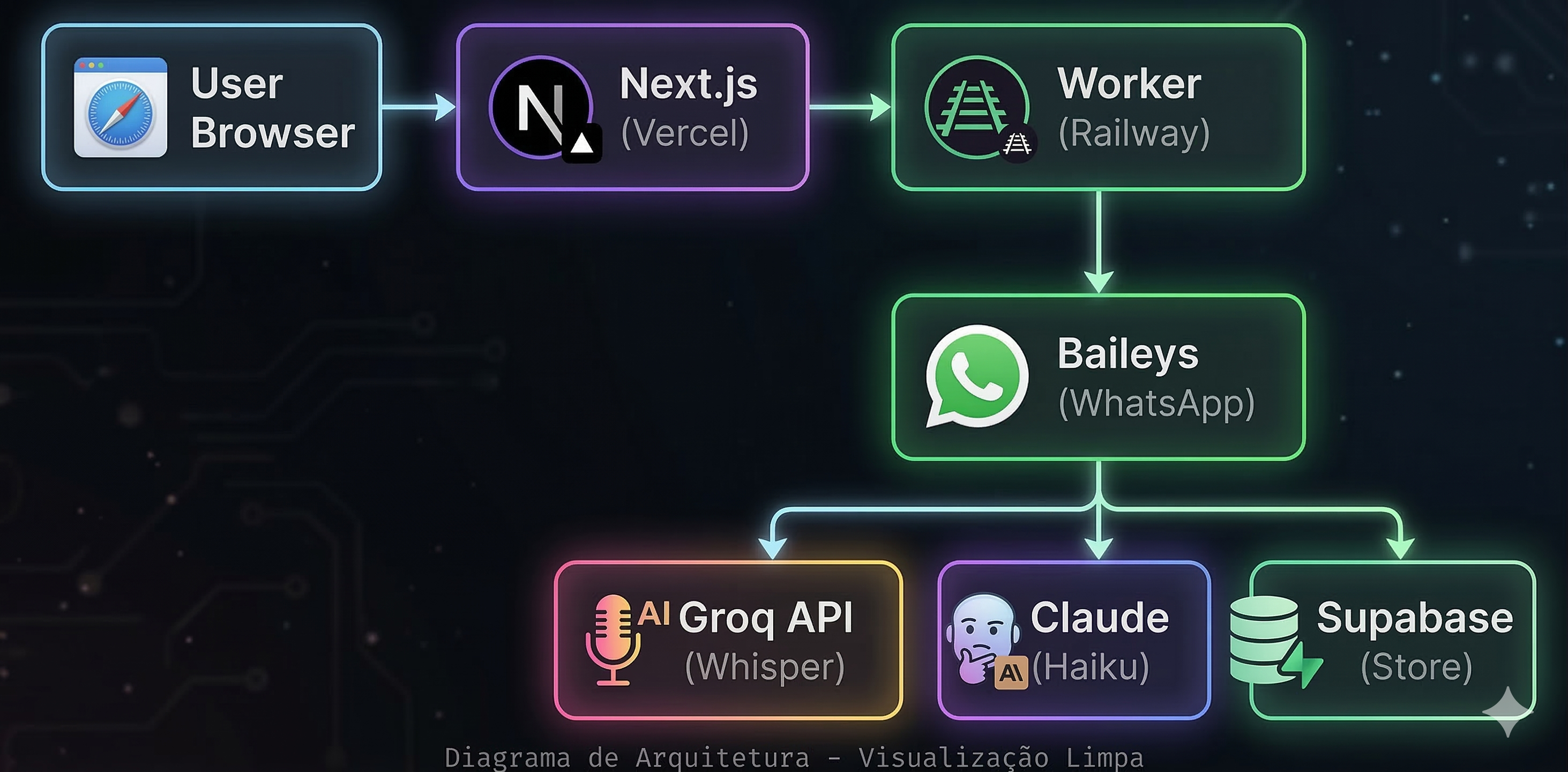
Falavra runs as two separate services:
-
Next.js app on Vercel — Landing page, dashboard, auth, billing. Stateless. Talks to Supabase for data and Stripe for payments.
-
Worker on Railway — A plain Node.js HTTP server (no Express, no framework). Holds active WhatsApp socket connections, processes voice messages, runs the transcription pipeline. Stateful.
User → Next.js (Vercel) → API route → workerFetch() → Worker (Railway)
                                                          ↕
                                                     WhatsApp (Baileys)
                                                          ↕
                                                     Groq Whisper + Claude
The split exists because Vercel functions are stateless and short-lived. A WhatsApp socket connection needs to stay alive for hours. Railway gives me a persistent process where Baileys can maintain active connections.
The two services talk through a shared secret:
function workerFetch(path: string, options?: RequestInit) {
  return fetch(`${WORKER_URL}${path}`, {
    ...options,
    headers: {
      Authorization: `Bearer ${WORKER_SECRET}`,
      'Content-Type': 'application/json',
    },
  })
}
Every Next.js API route that touches WhatsApp is a thin proxy to the worker. The worker does the real work.
Session Management
When a user clicks "Connect WhatsApp" in the dashboard, here is what happens:
- Next.js calls
POST /sessionon the worker with the user's ID - Worker calls
makeWASocket()from Baileys with the user's stored credentials (or none, if first connection) - Baileys generates a QR code
- User scans QR with their phone
- Baileys completes the pairing handshake
- Socket starts receiving messages
const socket = makeWASocket({
  auth: state,
  browser: Browsers.macOS('Chrome'),
  version: await fetchLatestWaWebVersion({}),
  printQRInTerminal: false,
})
The Browsers.macOS('Chrome') is not cosmetic — it tells WhatsApp's servers what kind of linked device this is. Picking a plausible browser identity reduces the chance of being flagged.
fetchLatestWaWebVersion() grabs the current WhatsApp Web version number. If your client reports an outdated version, WhatsApp might reject the connection or force a re-pair.
The Auth State Problem
Here is where things get interesting. Baileys stores authentication credentials — encryption keys, device identity, Signal protocol sessions — on the filesystem by default. That works fine on your laptop. It does not work on Railway, where every deployment wipes the filesystem.
Without persistent auth state, every deployment would require every user to re-scan their QR code. For a product people pay for, that is unacceptable.
The fix: store auth state in Supabase.
export function useSupabaseAuthState(userId: string) {
  async function readData(key: string) {
    const { data } = await supabase
      .from('whatsapp_auth_state')
      .select('value')
      .eq('user_id', userId)
      .eq('key', key)
      .single()

    if (!data) return null
    return JSON.parse(JSON.stringify(data.value), BufferJSON.reviver)
  }

  async function writeData(key: string, value: any) {
    const serialized = JSON.parse(JSON.stringify(value, BufferJSON.replacer))
    await supabase
      .from('whatsapp_auth_state')
      .upsert({ user_id: userId, key, value: serialized, updated_at: new Date().toISOString() })
  }

  // ... returns { state, saveCreds, removeData }
}
Every credential update — new pre-keys, session keys, app state sync keys — gets written to Supabase immediately. On worker startup, the boot sequence queries all stored credentials and restores every session automatically:
// Worker startup: restore all sessions
const { data: storedSessions } = await supabase
  .from('whatsapp_auth_state')
  .select('user_id')
  .eq('key', 'creds')

for (const { user_id } of storedSessions) {
  await createSession(user_id)
}
Deploy to Railway, sessions come back online in seconds. Users never notice.
One quirk: the double JSON parse. Supabase returns JSONB columns as pre-parsed JavaScript objects, but Baileys' BufferJSON.reviver needs to run on the raw JSON string to reconstruct Buffer objects. So you serialize to JSON, then parse it again with the reviver. Ugly? Yes. Works? Also yes.
The Transcription Pipeline
Once a WhatsApp connection is live, the worker listens for incoming messages:
socket.ev.on('messages.upsert', async ({ messages }) => {
  for (const msg of messages) {
    if (msg.message?.audioMessage) {
      await handleAudioMessage(msg, userId, socket)
    }
  }
})
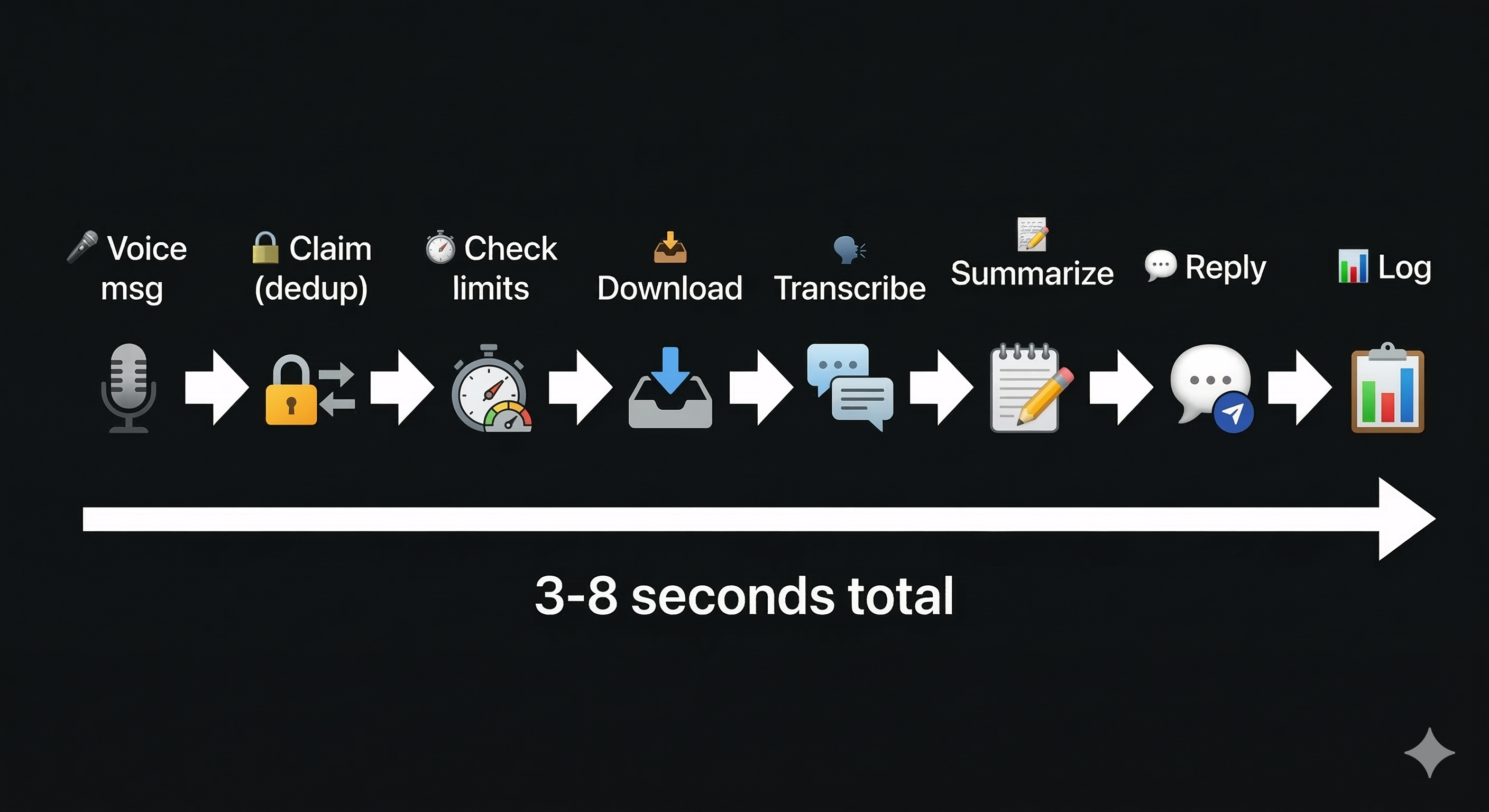
The pipeline for each voice message:
- Claim the message — atomic INSERT into
message_claims(more on this below) - Check usage limits — query the user's monthly usage against their plan
- Download audio — Baileys'
downloadMediaMessage()fetches the encrypted audio from WhatsApp's CDN and decrypts it - Transcribe — Send to Groq's Whisper v3 Turbo API ($0.04/hour, 2.8x cheaper than the standard model, equivalent quality)
- Summarize (if longer than 2 minutes) — Claude Haiku generates a one-paragraph summary
- Format and reply — Send the transcription back as a WhatsApp message, quoted under the original audio
- Log — Write transcription to Supabase for the user's dashboard
- Increment usage — Atomic RPC call to update monthly minutes consumed
The whole flow takes 3-8 seconds depending on audio length.
The Dedup Problem
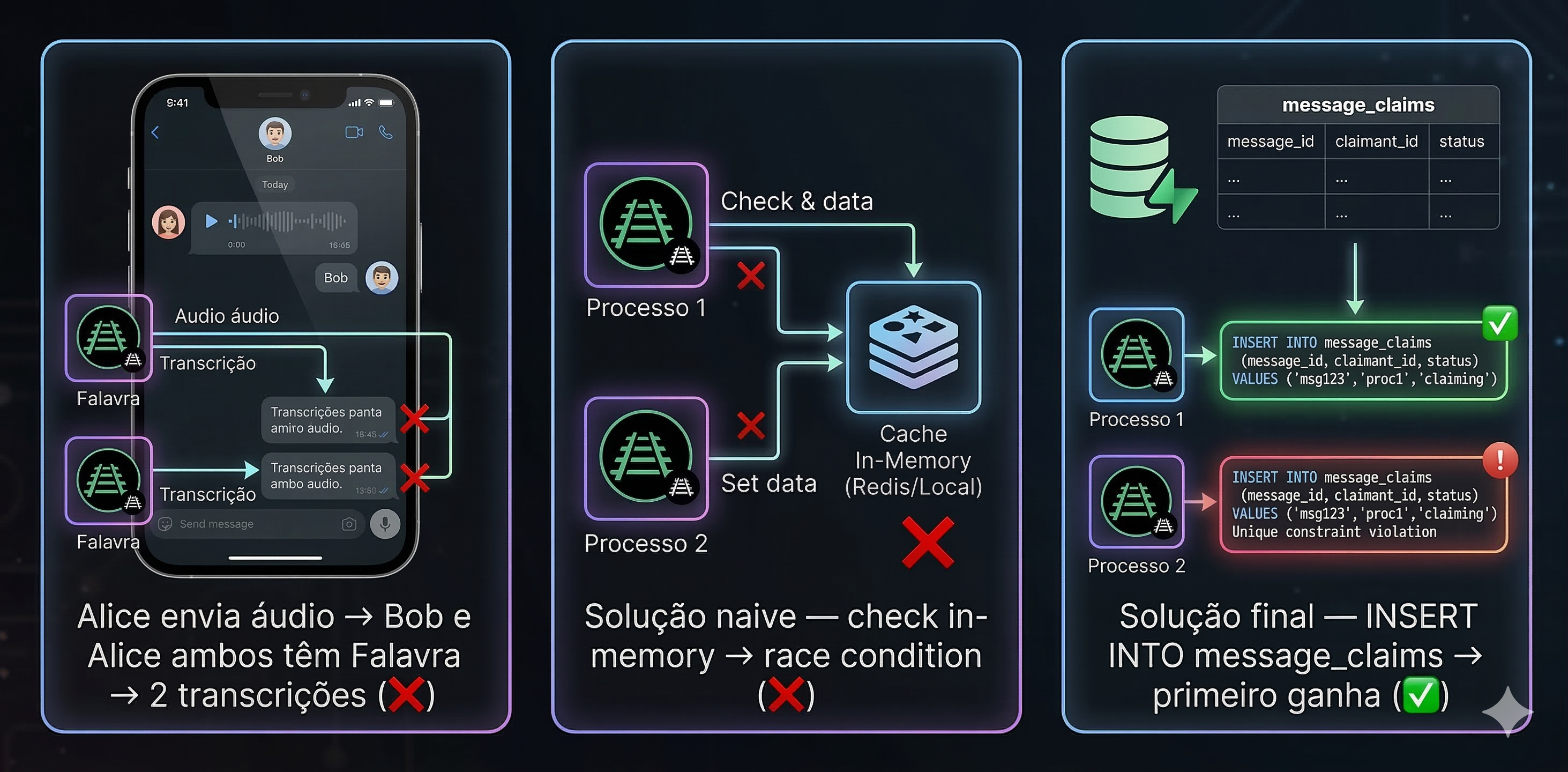
This was the nastiest bug. When two people in a DM both use Falavra, the same voice message arrives on both their sessions. Without dedup, the audio gets transcribed twice: two API calls, two replies, two charges.
The first attempt was an in-memory check — "if the sender has an active Falavra session, skip processing on the receiver's side." This worked until it did not. Race conditions, timing issues, edge cases with sessions that were technically active but not fully connected.
The fix was database-level dedup with an atomic claim:
const { data } = await supabase
  .from('message_claims')
  .insert({ message_id: msg.key.id, user_id: userId })
  .select('message_id')
  .single()

if (!data) {
  // Another session already claimed this message
  return
}
message_claims has a PRIMARY KEY on message_id — not a compound key with user_id, just the message ID alone. First INSERT wins. Second INSERT hits a constraint violation and returns no rows. One database round-trip, zero race conditions. The kind of solution that is embarrassingly obvious in hindsight.
The Bot Identity
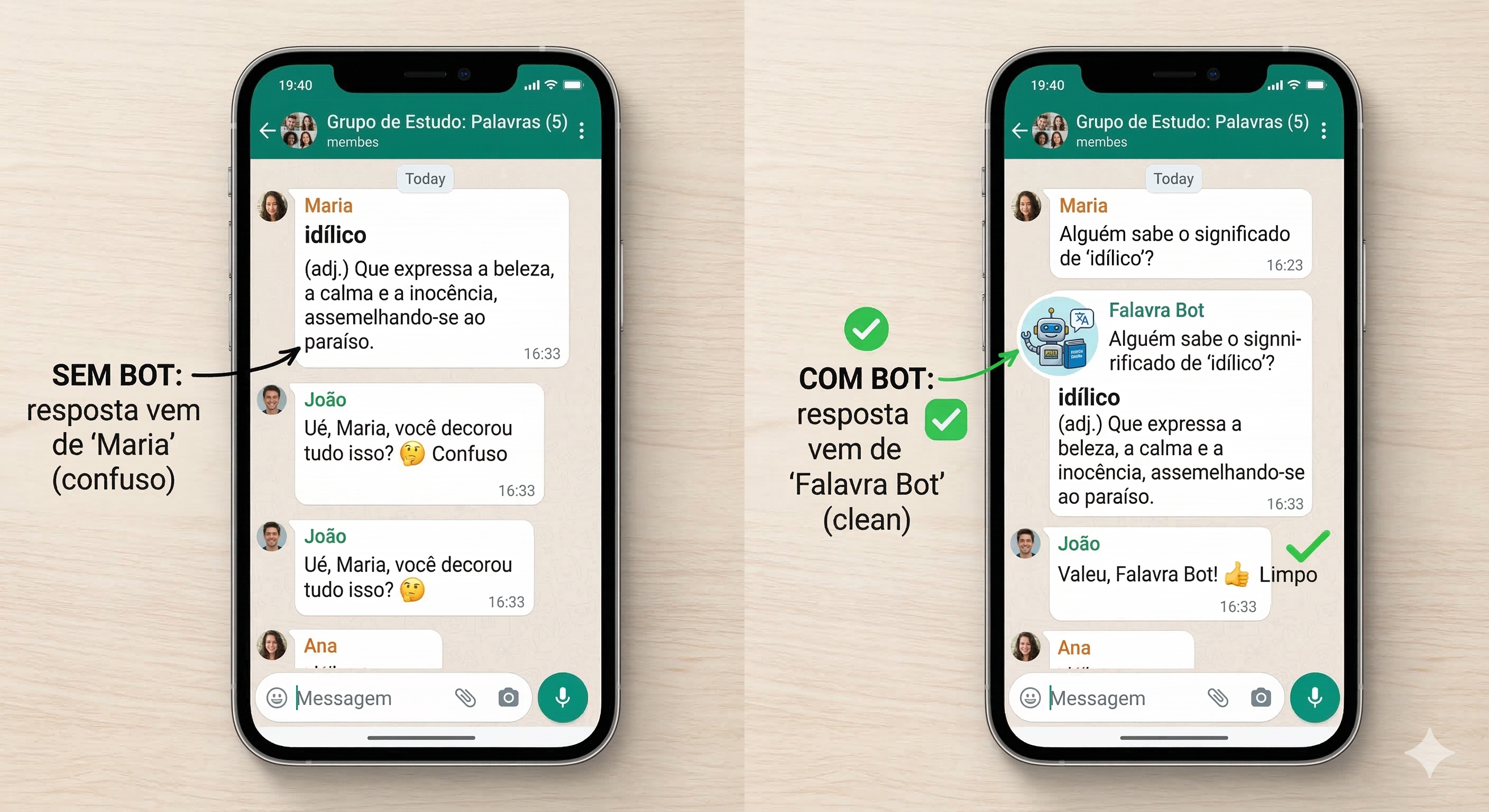
Users connect their personal WhatsApp to Falavra. That works for DMs — your messages, your transcription. But groups are different.
If five people in a group use Falavra, the same audio triggers five sessions. The message dedup prevents five transcriptions, but whoever claims it first sends the reply from their personal number. Now your group gets a transcription from "Maria" even though "João" sent the audio. Weird. Confusing.
The solution: a dedicated bot. A separate WhatsApp number that joins groups as a neutral transcription service. The bot has its own auth state table (bot_auth_state), its own session manager (bot-session.ts), and its own message handler.
When the bot is active in a group, user sessions skip that group entirely. The bot handles all group audio, replies from a consistent identity, and usage gets billed to the group's owner (whoever registered the group in the dashboard).
The managed groups are stored in a Set for O(1) lookup:
let managedGroups = new Set<string>()

export function isBotManagedGroup(jid: string): boolean {
  return managedGroups.has(jid)
}
On startup and on group changes, the set refreshes from the database. User sessions check isBotManagedGroup(jid) before processing any group message — if the bot owns it, they bail.
Usage Limits and Atomicity
Every plan has a monthly minute cap. The dangerous part is enforcing it when multiple sessions might process audio simultaneously.
A naive implementation would read the current usage, check against the limit, then increment. But between the read and the increment, another session could have already pushed the user over the limit.
The fix is an atomic PostgreSQL function:
INSERT INTO usage (user_id, month, seconds_used, seconds_limit)
VALUES (p_user_id, p_month, p_seconds, p_limit)
ON CONFLICT (user_id, month)
DO UPDATE SET seconds_used = usage.seconds_used + p_seconds
WHERE usage.seconds_used + p_seconds <= usage.seconds_limit
RETURNING seconds_used, seconds_limit;
If the increment would exceed the limit, the WHERE clause fails and no rows are returned. The pipeline checks the return value — no rows means the user is over their limit. One query, no race conditions, enforced at the database level.
What Can Go Wrong
Let me be honest about the risks, because there are real ones.
WhatsApp can ban your session. They actively fight unofficial clients. If they detect Baileys-style behavior — unusual message patterns, too many connections from one IP, suspicious linked device signatures — they can terminate the session. I have not been banned yet. That does not mean it will not happen.
Protocol changes. WhatsApp updates their protocol regularly. When they do, Baileys needs to be updated too. The library pins to 7.0.0-rc.9 — a release candidate, not even a stable version. If WhatsApp pushes a breaking protocol change and Baileys is slow to update, sessions go down until a fix lands.
Account-level risk. Users are connecting their personal WhatsApp accounts. If WhatsApp decides Falavra is abusive, they could ban not just the Baileys session but the user's entire WhatsApp account. I warn users about this in the terms of service. Nobody has read the terms of service.
No SLA. Meta's Business API comes with uptime guarantees and support. Baileys comes with a GitHub issues tab. If something breaks at 3am, I am the support team.
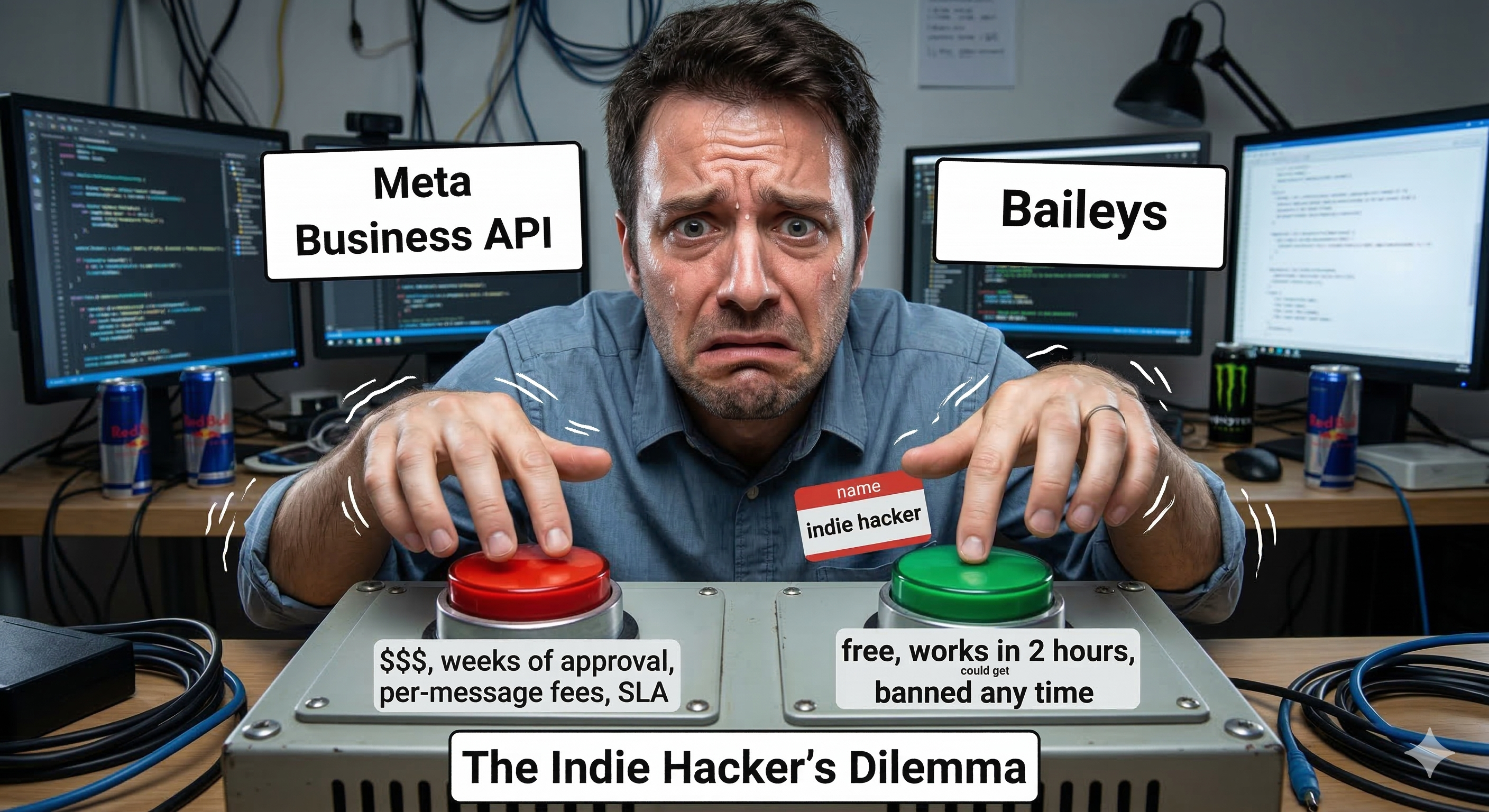
Why Not Just Use the Business API?
Cost, speed, and control.
The WhatsApp Business API requires a Meta Business Account, a verified business, and a phone number dedicated to the API. The approval process takes days to weeks. Per-message pricing varies by country but adds up fast for a product that sends hundreds of replies per day.
With Baileys, I went from "idea" to "working prototype" in a weekend. No approval process, no Meta dashboard, no per-message fees. The entire cost is Groq's transcription API ($0.04/hour) and Claude Haiku for summaries.
For an indie product validating product-market fit, this trade-off is correct. Ship fast, charge for the value, and migrate to the official API if the product survives long enough to need it.
The migration path is there: the pipeline uses a MessageSender interface that abstracts the actual sending mechanism. Swapping Baileys for the Business API means implementing one interface.
interface MessageSender {
  sendText(jid: string, text: string, quotedMsg?: WAMessage): Promise<void>
}
One interface. One swap. The rest of the pipeline does not know or care where the message goes.
The 1,414-Line Worker
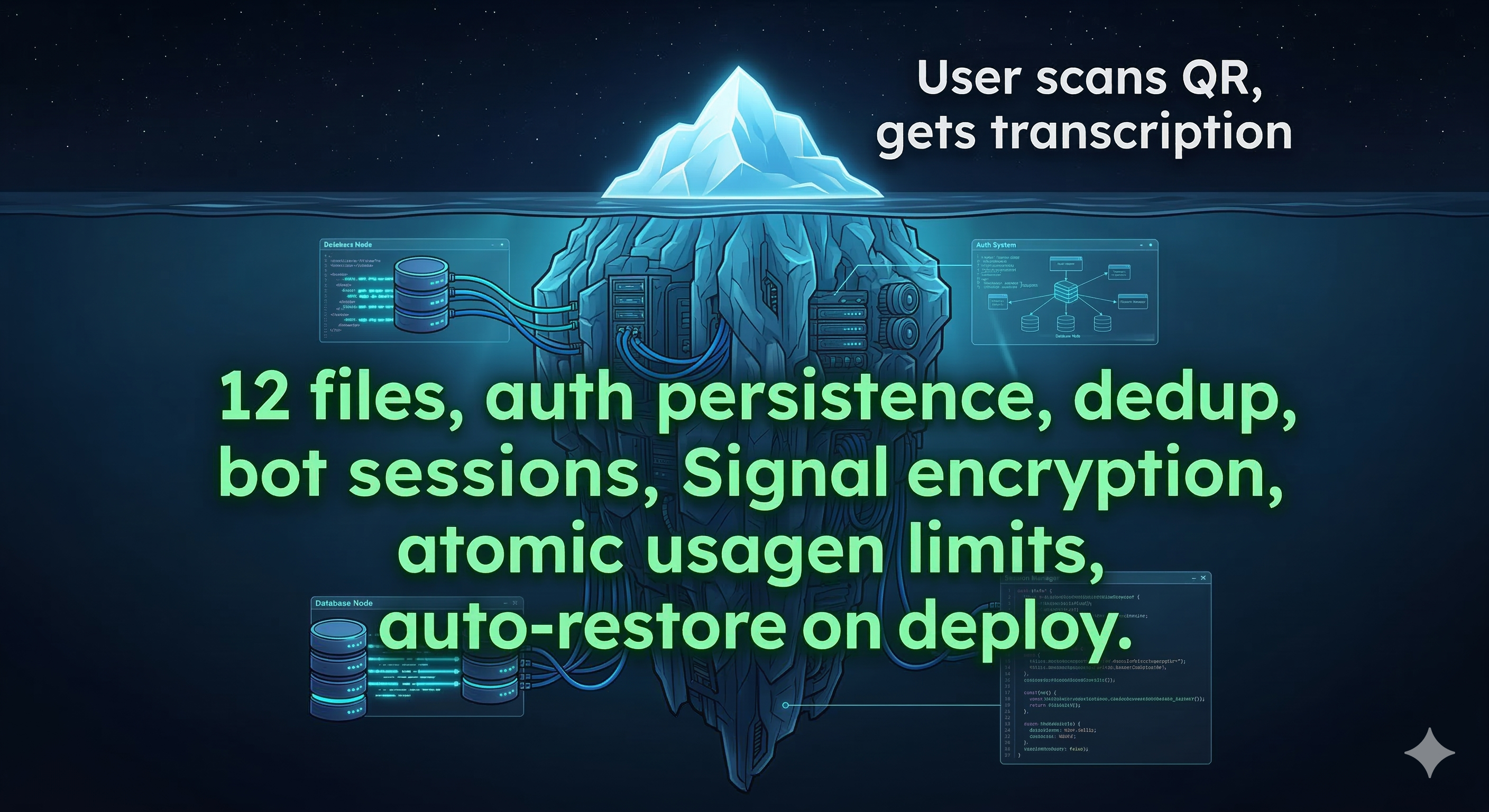
The entire worker is 1,414 lines across 12 files. That is the complete WhatsApp integration — session management, bot sessions, message handling, transcription pipeline, auth persistence, group sync, usage tracking. No framework. No ORM. Just Node.js, Baileys, and Supabase.
worker/
├── index.ts              (322 lines) — HTTP server + routing
├── session-manager.ts    (183 lines) — User session lifecycle
├── bot-session.ts        (200 lines) — Bot session lifecycle
├── pipeline.ts           (191 lines) — Groq + Claude + logging
├── supabase-auth-state.ts(128 lines) — User credential storage
├── bot-auth-state.ts     (119 lines) — Bot credential storage
├── message-handler.ts    (123 lines) — User message processing
├── bot-message-handler.ts (65 lines) — Bot message processing
├── group-sync.ts          (50 lines) — WhatsApp → DB group sync
├── message-sender.ts      (13 lines) — Send abstraction
├── supabase.ts            (12 lines) — DB client factory
└── plans.ts                (8 lines) — Plan constants
Sometimes the right architecture is just a flat folder with small files that do one thing each.
Would I Do It Again?
Without hesitation. The Business API is the right choice for companies with compliance requirements, enterprise SLAs, and legal teams that need to check a box. It is not the right choice for a solo developer validating whether people will pay for WhatsApp transcription.
Baileys gave me a product in a weekend and a business in a week. If WhatsApp shuts it down tomorrow, I have a codebase, a customer list, and a proven concept. The migration to the official API is an afternoon of work, not a rewrite.
Ship with what gets you to market. Harden later. That is not recklessness — it is sequencing.